MoleditPy Job Server





A shared job queue for one PC on your network. Trusted users submit calculations from Job Manager, the browser or Python, and an administrator runs the server from MoleditPy or the command line.
Warning: Never expose Job Server to the public internet. Use localhost, a private LAN over HTTPS, or a private Tailscale tailnet only. Do not use Tailscale Funnel, router port forwarding, a public reverse proxy, or an internet tunnel. Jobs execute arbitrary commands under the service OS account. Only admit trusted users, restrict tailnet access, and run under a low-privilege account. Authentication is not an OS sandbox.
What it does
- Queue: CPU and memory budgets, priorities, dependencies, pause and force run. A job
that only waits, such as a script watching for a file, can ask for 0 cores and 0 memory
and then takes no share of the budget. A waiting job can be held (
POST /jobs/{id}/hold) by its owner or an administrator; a held job does not start, even when forced. - Durable jobs: jobs run in detached supervisors and a SQLite ledger tracks them, so closing MoleditPy or restarting the daemon does not stop a calculation.
- Accounts: users and administrators, device keys, password changes and resets, enable, disable and delete, with an activity log. See Accounts.
- Job folders: open a job’s folder in File Explorer on the server PC, or browse and download it from the Web UI or Job Manager. See Job folders.
- Local by default: no listener starts until you ask, and it binds
127.0.0.1. LAN and Tailscale access are explicit opt-ins.
Quick start
- In MoleditPy, install the latest Job Server ZIP from Releases with the Plugin Installer.
- Open Extensions → Job Server…. If Python libraries are missing, it names them.
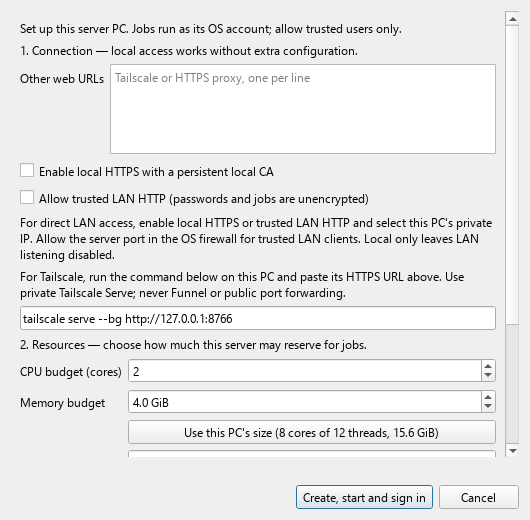
- On first use, the setup guide asks for a resource budget and an administrator, then starts the server and signs in this window. A new server’s budget starts at this PC’s size.
- To reach it from another PC, follow Connecting from another PC (日本語).
- In Job Manager, add a Job Server host and choose Sign in / register device.
Closing the window does not stop the daemon. Server → Stop stops it and preserves
running jobs; so does moleditpy-job-server stop from a terminal
(command line). If the window cannot verify a running daemon (started by an older version,
or its port changed while it ran), Start, Stop and Restart offer to stop its
process instead. A portable MoleditPy build needs a Python selected in Settings → Daemon Python runtime.
Desktop window
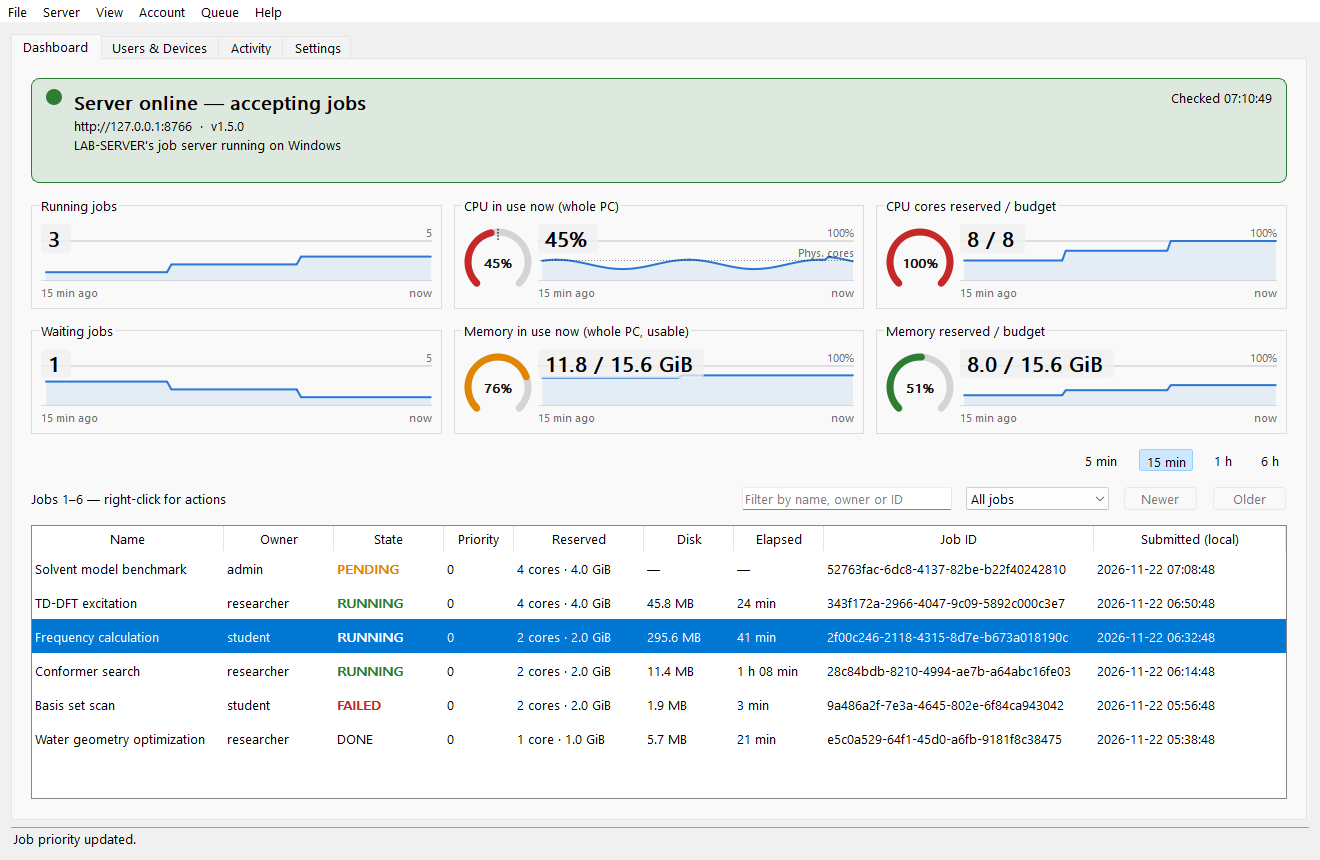
The administrator’s console: a dashboard with live CPU and memory dials beside the reservations, the job list, and tabs for users and devices, the activity log and settings. Right-click a job, user or device for its actions. See the desktop window.
Web UI
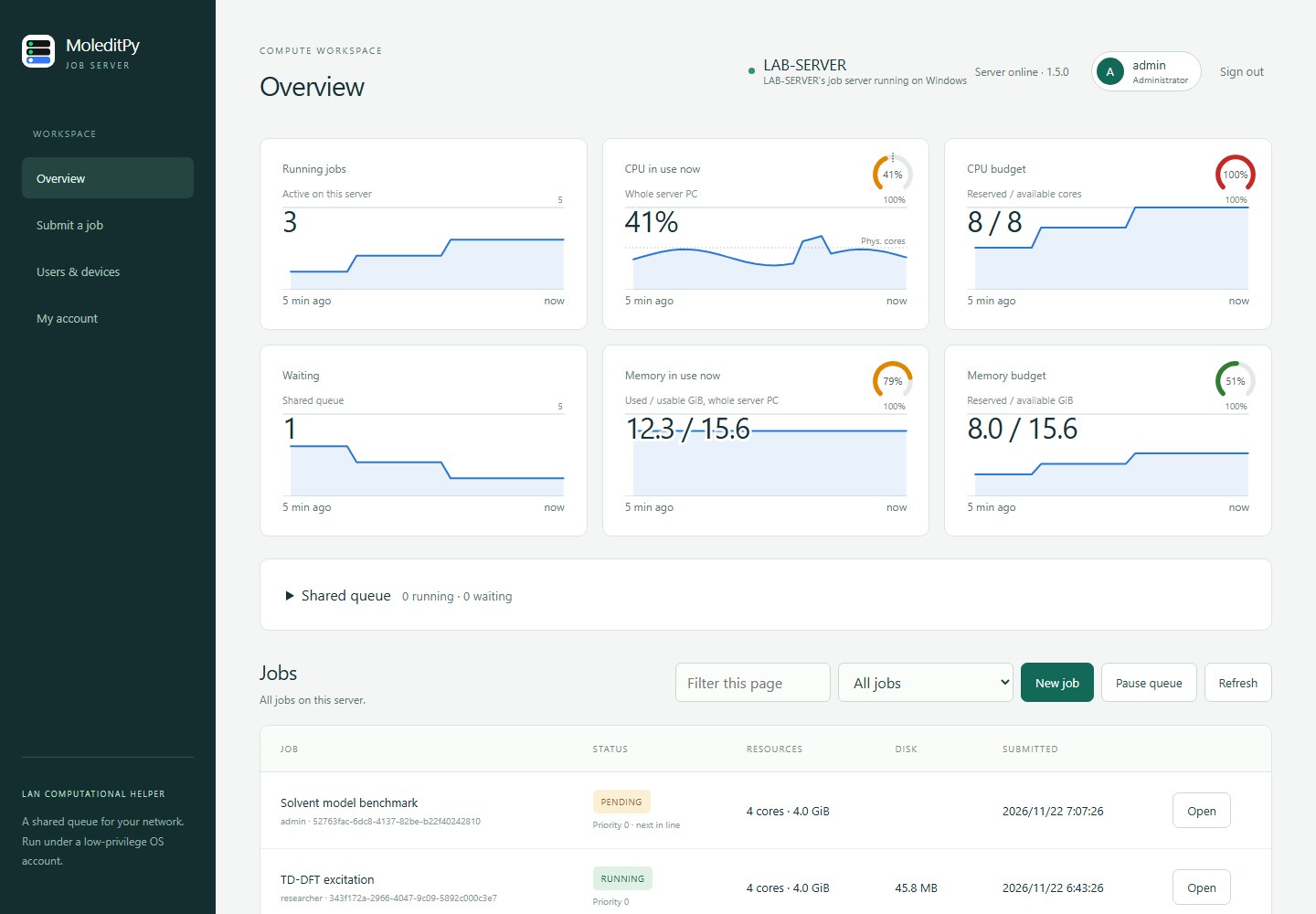
Open http://127.0.0.1:8766/ on the server PC, or the address you set up for other PCs. Users submit jobs, follow output, browse job folders and manage their own account; administrators also get queue controls and user administration. See the Web UI.
Headless server
Python 3.11+, on a low-privilege OS account; Qt and MoleditPy are not needed:
python -m pip install moleditpy-job-server
moleditpy-job-server init --tls --admin admin
moleditpy-job-server serve
The same commands administer the server from a terminal — queue, jobs, users, devices and the activity log. See the headless server and command line.
Python client
job_server.client.JobServerClient submits jobs from Python, with
resumable, hash-verified uploads and downloads. See
the Python client.
AI agents
Agents reach this server through Job Manager’s script command line. A ready-made operating procedure for agents is kept as a skill in the Job Manager repository: moleditpy-job-manager.
Limits
CPU and memory budgets are advisory: they decide when jobs start, not what a job may use, and all jobs share the service OS account. See limits and Execution and limits.
Documentation
| Topic | Page |
|---|---|
| Users, passwords, devices and recovery | Accounts |
| Reaching the server from another PC | Step by step (日本語), LAN details, HTTPS and Tailscale |
| Connecting from a Mac: certificates and Local Network permission | Connecting from a Mac |
| Desktop window | Desktop window |
| Web UI | Web UI |
| Headless server and the admin command line | Headless server |
| Python client | Python client |
| Job Manager | Integration |
| Job folder API | Job folders |
| Running Linux programs from Windows | WSL |
| Executors, walltime and storage | Execution and limits |
| Security | SECURITY.md, audit, specification audit |
| Testing and releases | Verification, test coverage, workflows |
Development
git clone --recurse-submodules https://github.com/HiroYokoyama/moleditpy_job_server.git
cd moleditpy_job_server
python -m pip install -e ".[test,gui]"
python -m pytest -q -n 4
python -m ruff check job_server scripts tests integration setup.py
python -m build
python scripts/build_plugin.py
License
LGPL-3.0-or-later. See LICENSE, COPYING and dependency and provenance terms. Upstream execution code and third-party components keep their own terms.