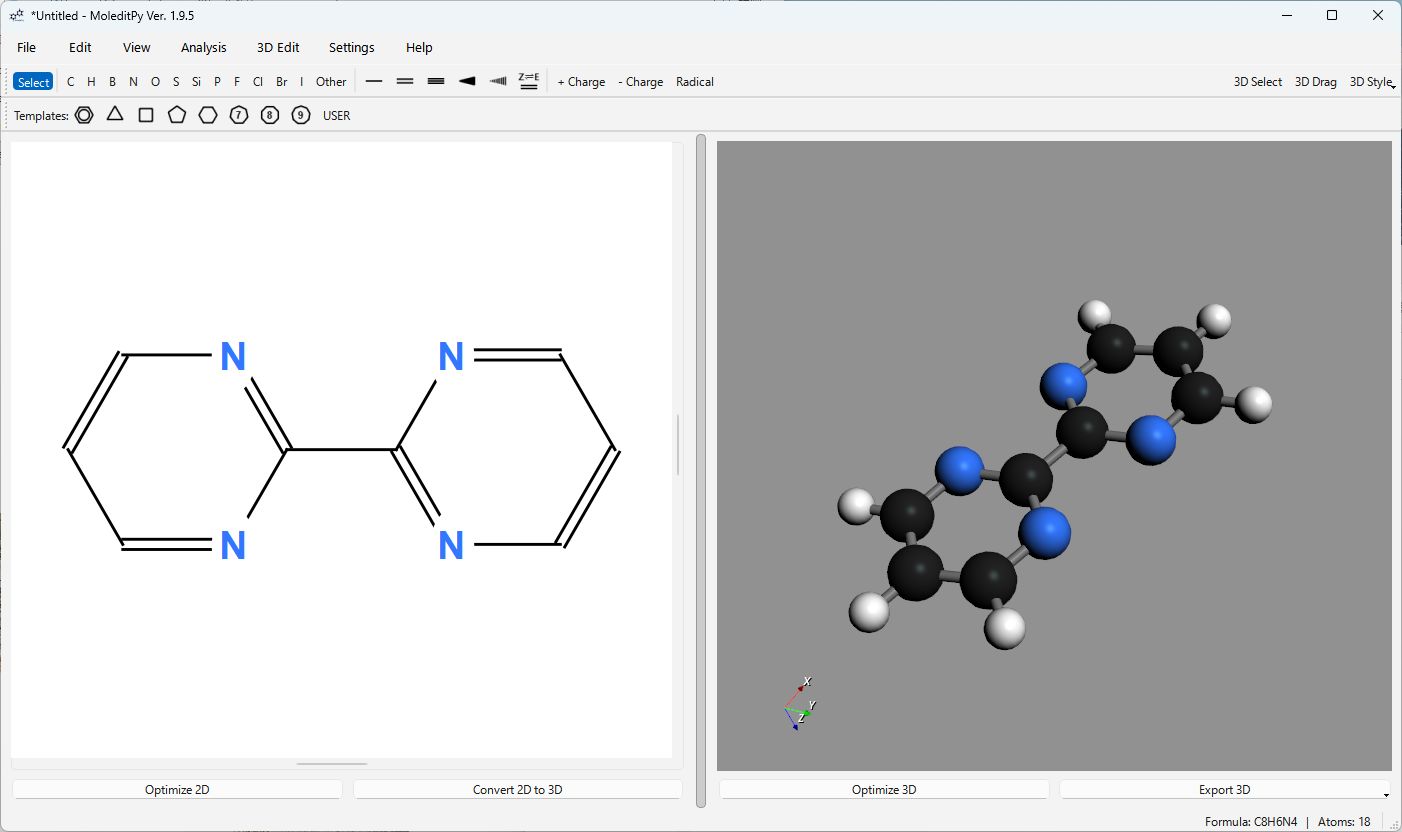
Sketch a structure2D構造を描画
Build molecules with ring templates, chains, stereochemistry, charges, and the full periodic table.環テンプレート、アルキル鎖、立体化学(楔形結合)、形式電荷、全周期表元素を使って分子を素早く構築。
 MoleditPy v4
Free & open source · GPL-3.0
Unified Molecular Workspace2D/3D・計算化学を統合する分子ワークスペース
MoleditPy brings 2D sketching, interactive 3D geometry editing, and computational-chemistry preparation into one programmable desktop workspace.MoleditPyは、2D分子描画、直感的な3D構造モデリング、計算化学の準備をシームレスに統合した拡張自在な分子エディターです。
01 / See it in action動画で見る
An introduction to MoleditPy and a demonstration of the PySCF Calculator workflow. MoleditPyの紹介と、PySCF Calculatorのデモンストレーション。
02 / Seamless workflowシームレスなワークフロー
Build molecules with ring templates, chains, stereochemistry, charges, and the full periodic table.環テンプレート、アルキル鎖、立体化学(楔形結合)、形式電荷、全周期表元素を使って分子を素早く構築。
Generate conformers, drag atoms in the viewport, set exact geometry, and optimize with MMFF94 or UFF.高精度な初期配座生成、3Dビューでの原子ドラッグ操作、結合長・結合角・二面角の精密指定、力場(MMFF94/UFF)最適化に対応。
Inspect molecular properties and transition directly into downstream calculation workflows with practical file exports.分子特性を瞬時に確認し、多彩なファイル形式(MOL, SDF, XYZ等)で量子化学計算や後続の解析へスムーズに出力。
03 / Built for molecular work分子研究のための機能群
Visual intuition when you are exploring; exact control when the geometry matters. 自由なスケッチには直感的な操作性を、構造の最適化には精密な幾何制御を提供します。
Draw and edit molecular structures with simple mouse controls on a responsive PyQt6 canvas. PyQt6によるモダンで軽快なキャンバス上で、原子や結合を直感的なマウス操作で描画・編集できます。
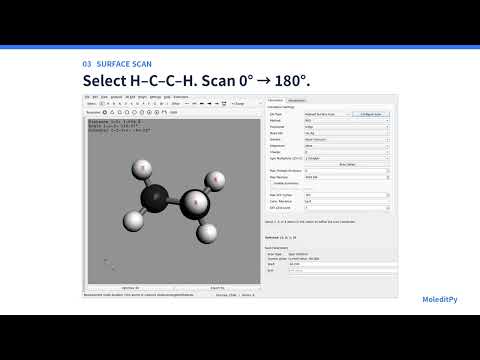
Conformation generation and fine-grained geometric adjustments directly in the 3D viewport. RDKitによる高精度配座生成と、3Dビュー内で原子を直接ドラッグ操作できる本格的な構造編集ツール群。
Compute molecular properties and export structures to computational chemistry software and rendering tools. 分子特性の自動計算から、DFT計算ソフト・3Dプリント・画像出力まで幅広く対応。
Extend the editor with custom scripts and browse community-contributed plugins. Pythonスクリプトを追加するだけで機能を拡張できるプラグイン機構とコミュニティ連携。
04 / Python ExtensibilityPythonによる自由な拡張
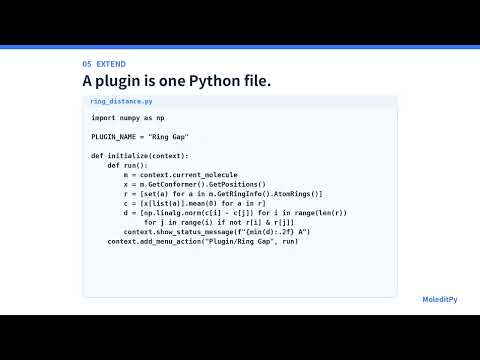
Write a small Python plugin to add an action, work with the current molecule, connect a custom calculation, or build a focused tool for your lab.わずか数行のPythonプラグインで、独自メニューの追加、分子データの処理、外部計算ツールとの連携など、研究に特化した機能を素早く構築できます。
def initialize(context):
    context.add_menu_action(
        "Research/My analysis",
        lambda: analyze(
            context.current_molecule
        ),
    )
05 / Get startedはじめる
Recommended for Windows, macOS, and Linux. Windows、macOS、Linux対応(推奨)。
pip install moleditpy-installer
python -m moleditpy_installer
Need help? Step-by-step guides for Windows, macOS, and Linux, plus troubleshooting, are on the wiki.
お困りの場合は、WikiのWindows・macOS・Linux向けインストール手順とトラブルシューティングをご覧ください。
Other ways to installその他のインストール方法